
The calendar you run the day from.
A drag-and-drop tape chart that shows every room and every stay at a glance. Take a booking, move a guest, extend a night or block a room — all on one screen, and everyone at the desk is looking at the same live picture.
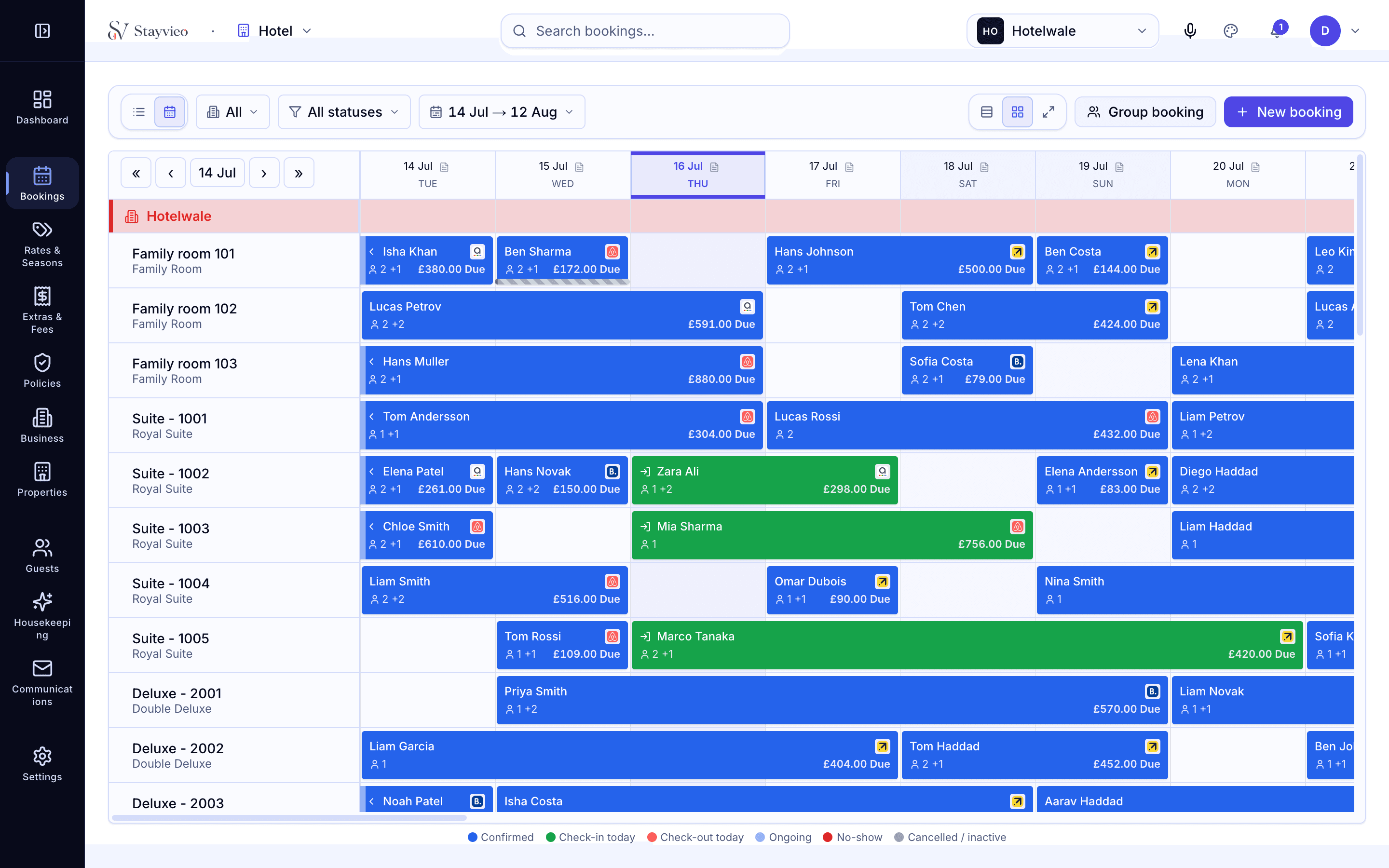
Every room and stay, on one grid.
The booking calendar lays your rooms down the side and the dates across the top, so a full week reads in a single glance. Bookings from the phone, your website and the OTAs all land here, colour-coded by status, so you always know what is arriving, staying and leaving today.
- Drag a booking to move dates or change rooms
- Stretch a stay to add a night without re-keying it
- Colour-coded by arriving, in-house and departing
Arrivals and departures without the fuss.
Check a guest in, note their room, and settle the balance at checkout without leaving the calendar. Because the folio, notes and payments sit behind each booking, whoever is on the desk has the full story — no shuffling between a diary, a card machine and a paper ledger.
- One-click check-in and checkout from the booking
- Guest notes, folio and payments behind every stay
- Handover is clean — the screen is the source of truth
Sell every room, never twice.
Because the calendar and the channel manager are the same system, a room that sells anywhere closes everywhere. Drag a guest into a bigger room and it counts as a free upgrade with the trail kept; block a room for maintenance and it drops out of sale on every channel at once.
- Availability closes across all channels instantly
- Free upgrades keep the agreed rate and an audit trail
- Maintenance blocks remove a room from sale everywhere
Works with everything else you run.
Channel manager
OTA bookings drop straight onto this calendar.
ExploreDirect bookings
Website reservations land on the tape chart, commission-free.
ExplorePayments & invoicing
Settle the folio and take the balance at checkout.
ExploreRestaurant & EPOS
Dining charges post onto the room folio automatically.
ExploreCan more than one person use the calendar at once?
Yes. The tape chart is live, so if a colleague takes a booking or checks a guest in, you see it appear. Everyone at the desk is working from the same up-to-date picture.
Will OTA bookings appear on the same calendar?
Yes. Bookings from Booking.com, Airbnb, Expedia and your own website all land on the one tape chart, so you never have a separate diary to reconcile.
How do I move a guest to a different room?
Drag the booking to the new room on the calendar. If it is a larger room type, Stayvieo records it as a free upgrade, keeps the rate you agreed, and stores the trail so the change is never a mystery later.
Can I block a room for maintenance or an owner stay?
Yes. Block the dates on the calendar and the room drops out of sale everywhere at once, so it can never be booked while it is out of service.
Does it work on a tablet at the desk?
Yes. The calendar and front-desk screens run in the browser and are built to be used on a tablet or laptop at the desk, not only a full workstation.
See the calendar on your own rooms.
See Stayvieo on your own property in a fifteen-minute call — no pressure, no script.
Book a demo →